For freelancers and small agencies
Hand over finished work with a manual your client will actually use.
Click through the task once. Get a step-by-step Client Owner's Manual with screenshots — your logo, your colors, behind a password. Your client needs no account.
Start free — pay when you publish $15/mo flat · unlimited manuals · 14-day refund
Records in Chrome on your computer. Get the extension
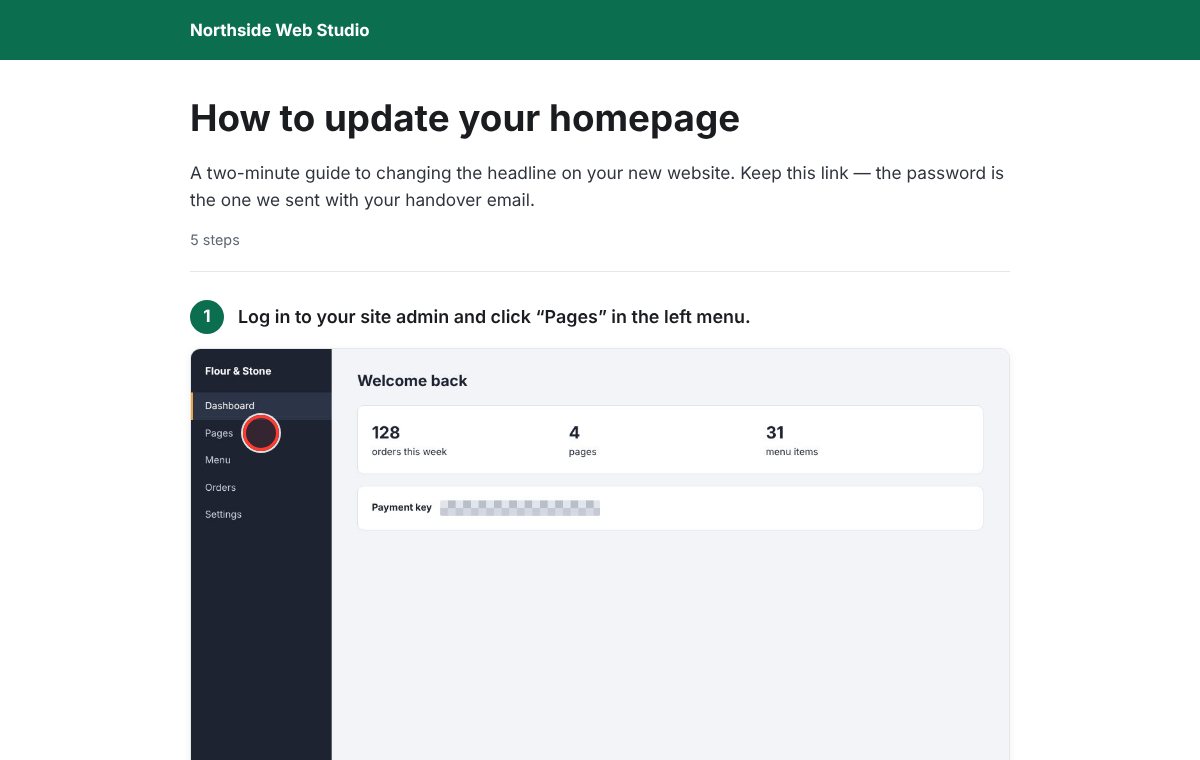 See a real example manual →
Record
Start the Chrome extension and do the job: update the homepage, add a product, issue a refund. Every click becomes a numbered step with a screenshot.
Clean up
Fix the wording, reorder or delete steps, and hide anything sensitive — passwords, customer data, API keys — before anyone else sees it.
Hand over
Add your logo and color, set a password, send one link. It reads like something your studio made, because our name isn't on it.
Stop answering “how do I change this again?”
The project ends, the questions don't. A handover manual turns the same five support emails into a link you send once — and makes the final invoice feel earned.
- “How to update your site”, “How to run your store”, “How to use what we built”.
- White-label: your brand on every page, ours nowhere.
- Password-protected link. No login, no app for your client to install.
- Hidden areas are removed from the image itself — not just covered up.
One flat price
$15/month
- Unlimited manuals and steps
- Unlimited client views
- Your logo and brand color
- Password on every manual
- No per-guide or per-view meter
Recording and editing are free. You subscribe when you publish your first manual. Not right for you? Refund your payment yourself within 14 days, from your account.
Questions
Does my client need an account?
No. They open your link, type the password you gave them, and read. That's it.
Will my client see your product name?
No. Published manuals carry your logo, your name and your color. Nothing of ours.
What if a screenshot shows a password or customer data?
Drag a box over it in the editor. The hidden area is pixelated into the published image itself, so the original pixels are never sent to your client.
What happens if I cancel?
Your manuals stay in your account as drafts, and published links stop working until you resubscribe.
Which browsers?
Recording needs Chrome (or a Chromium browser such as Edge or Brave). Clients can read manuals in any browser.